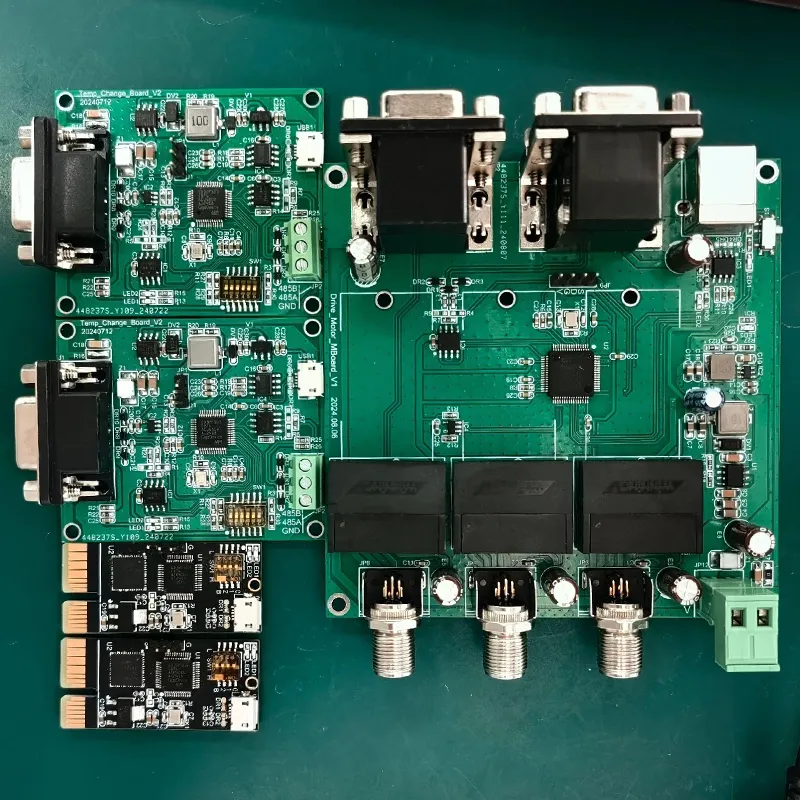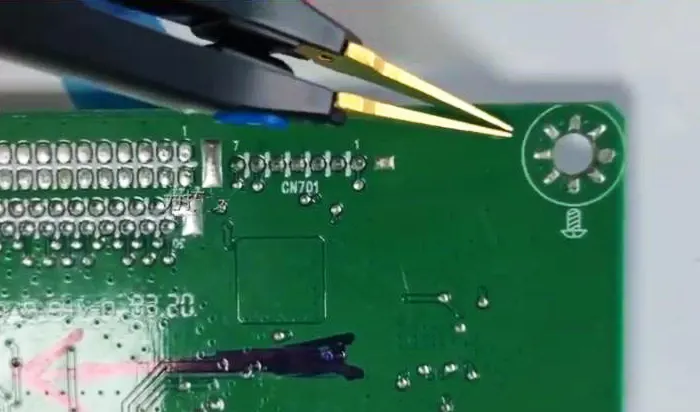
PCB grounding is a constant concern for PCB layout engineers. For example, how should we plan an effective grounding system on the board?
Should we route all grounds—such as analog, digital, and power grounds—separately, or should we connect them at a single point?
How can we eliminate ground loops on the circuit board?
Today’s focus is on PCB grounding design, PCB grounding techniques, and PCB grounding solutions.
What Is Grounding?
Although this question may seem a bit silly, there are differences between various types of grounding.
Electrical grounding refers to a conductor that serves as a common return path for current from various devices;
We commonly refer to it as the 0-potential node. We measure all other voltages in the system relative to this node.
Here is an overview of the different types of grounding nodes:
Floating Ground
A floating ground occurs when a system lacks a reliable ground connection.
Consequently, the voltage at the ground terminal and in the conductors is uncertain.
We consider an unintentional floating ground a system fault, as it may indicate a break in the grounding system.
However, some applications intentionally use a floating ground.
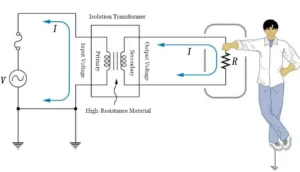
In low-voltage power supplies and test equipment, engineers use isolation transformers to isolate the low-voltage ground from the main grounding system.
This enhances safety.
Floating the ground on the low-voltage side, it prevents a ground current path from the main power source.
This provides electrical safety in the event of a fault on the low-voltage side.
Ground
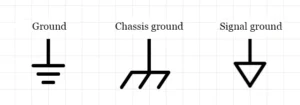
This is essentially a physical connection to the earth, serving as a safe return path for residual current.
Chassis Grounding (Safety Grounding)
Chassis grounding (safety grounding) refers to the connection of a safety conductor from the AC power source to the product’s enclosure or chassis.
Grounding and chassis grounding serve the same function and are often used interchangeably.
When it comes to PCB grounding, there is no one-size-fits-all approach.
To determine the best way to ground your system, you need to understand how current flows within it.
However, there are several methods to choose from, as well as some tips on best grounding practices that apply to most systems.
Signal Ground
Signal ground serves as the reference point for any analog or digital signal used in a circuit.
In most cases, signal ground is the same as power ground.
However, in certain situations, signals in a circuit use a separate, isolated ground to return signal current, which necessitates defining a distinct ground for the signal.
Signal ground is commonly found in sensitive equipment and measuring instruments.
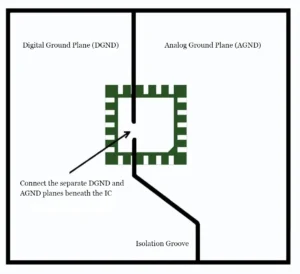
When we partition a circuit board into analog and digital sections, we typically route the ground plane beneath or near mixed-signal devices that have both analog and digital traces connected to them.
By connecting the analog and digital ground planes beneath a mixed-signal device, we can route mixed-signal traces along the shortest possible path.
This reduces the likelihood of interference with other analog or digital signals in the vicinity of the device.
Virtual Ground
Virtual ground is commonly found in operational amplifiers (op-amps).
A virtual ground (node) does not directly connect to the ground (GND) current return path.
Instead, it maintains a potential that matches the ground reference.
Engineers use a virtual ground to analyze the operation of operational amplifiers.
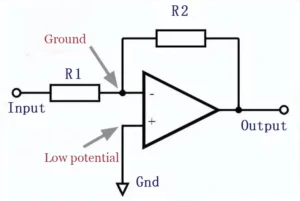
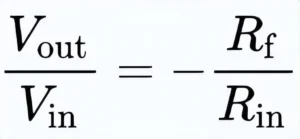
By taking the virtual ground potential into account and assuming that the operational amplifier does not draw current, we can obtain the following relationship.
AC Grounding
An AC grounding node has a low DC resistance, and the DC voltage remains stable even when subjected to minor disturbances.
Due to its DC value, this node cannot serve as a suitable ground, but because it is stable, it can function as a reference point.
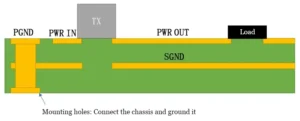
AC grounding is the standard method for bringing power to a circuit board that requires mains power and operates at moderately high currents.
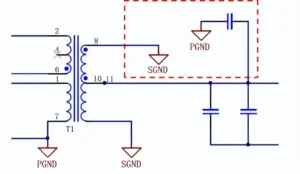
In the figure below, we introduce a 3-wire single-phase AC power supply into the system and use a transformer to step it down to the required level on the circuit board.
The separation between the primary ground (PGND) and secondary ground (SGND) in the PCB stackup means we now essentially have an isolated power supply on the circuit board.
This isolated supply exists alongside our other critical components.
These components may be high-speed digital or precision analog components.
Chassis Grounding
An important point to note in electronics is that not all systems have chassis grounding (safety grounding).
Typically, chassis grounding refers to the metal chassis of the enclosure and the connection established with it.
In a 3-wire AC system (hot, neutral, and ground) or a 3-wire DC system (DC+, DC common, and ground), chassis ground is typically connected to earth at the point where power enters the power supply.
We can also connect parts of the system to the chassis ground to absorb noise or improve safety (e.g., for ESD protection), as shown in the example below.
This arrangement provides common-mode noise filtering for AC or DC inputs on a 3-wire connection.
In the schematic below, we connect the chassis ground directly to the circuit board and provide a low-inductance ground contact to the enclosure.
Note that pin 3 on the connector serves as the ground.
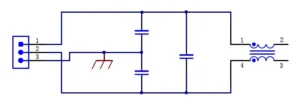
The chassis ground connection serves three purposes:
Since the chassis is now set to a global 0 V reference potential, it acts as a Faraday cage and provides broadband shielding.
It provides a safety feature that dissipates parasitic currents (from ESD, short circuits, or noise) back to ground.
It provides a low-impedance sink for common-mode noise at this input of the EMI filter, eliminating the need for ferrite beads or large chokes on the board.
Multiple Grounds
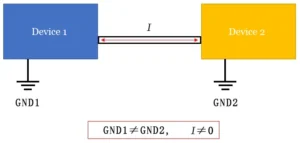
Multiple grounds typically occur when wiring between two pieces of equipment, and the cable may have shielding connected to the ground at each end.
Care must be taken here, as there may be a DC potential difference between the two ground connections, which can be as high as 10 V during laboratory measurements.
If we bridge the grounds (for example, by using the shielding along the shielded cable), this ground offset can cause large DC currents to flow through the cable.
Not all grounds are 0 V
Floating conductors or conductors in a system that reference different power sources may not share the same 0 V potential.
In other words, if two different devices have two ground connections but share the same reference, we will measure a non-zero voltage between them.
Engineers take care when using capacitive grounding in power systems to keep the ground reference consistent.
They use Y-coupled capacitors, which eliminate DC offset between planes while providing current isolation and high-frequency EMI filtering.
The following situation may occur when two devices use the same conductor for their ground connections.
If you measure the potential difference across the long conductor (for example, using a multimeter), it may not be zero, which means that some current is flowing along the conductor.
This potential difference between the ground or between the two ground connections is called a “ground offset.”
PCB Grounding Design
Ground Traces
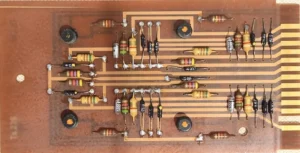
In older and simpler PCBs, we link all components connected to ground together using a common trace.
Common Ground Plane
A common ground plane is the most common practice in PCB design.
We cover the free space on the PCB that is not occupied by traces or components with a ground plane.
A common ground plane significantly improves the thermal characteristics of the PCB and also helps reduce electromagnetic interference (EMI).
Dedicated Ground Layer
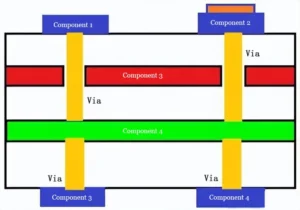
In multilayer PCBs, we use a dedicated ground layer.
We connect components to the ground layer through ground vias.
It is commonly found in dense, complex PCBs with three or more layers.
Power System Grounding
In power system installations, we connect all ground connections to the ground busbar.
We connect this busbar to a ground conductor.
We then connect the ground conductor to a ground rod or ground grid.
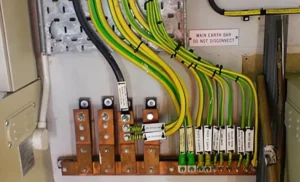
The grounding busbar collects all grounding conductors from all equipment into a single common point.
The grounding resistance at this point should be less than 5 ohms to ensure proper grounding; use high-gauge wire to connect the grounding busbar to the grounding system (ground rods and grounding grids).
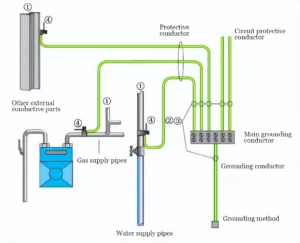
Equipotential Bonding or Grounding
Equipotential bonding means that every conductive element within a protected area should have the same ground potential.
This is achieved by electrically connecting equipment chassis, metal conduits, and all grounding devices.
Equipotential bonding ensures that there is no significant potential difference between any conductive parts in the area and prevents electric shock during a fault.
PCB Grounding Tips
Ensure All Connections on the PCB Are Complete
There should be no unconnected areas in the PCB layout. If there is an open space on your board, fill it with copper and vias to connect it to the ground plane.
This will create a structured path for all signals on the PCB to effectively reach ground.
Ground Plane
PCB designers commonly use a ground plane as one of the most effective techniques.
Engineers typically form a ground plane from copper and extend it across all PCB areas that do not contain components or traces.
Certain rules apply to ground planes, depending on the number of layers in the board.
For example, if the board has two layers, the rule dictates that the ground plane should be placed on the bottom layer, while traces and components should be placed on the top layer.
When placing the ground plane, ensure that it does not form a loop of conductive material.
Such a loop increases the ground plane’s susceptibility to electromagnetic interference (EMI).
When an external magnetic field interacts with the conductive loop, it acts as an inductor, generating a current known as a ground loop.
Ground loops can interfere with other circuits, causing electrical noise.
Designers may form a conductive loop when they place a ground plane beneath the entire bottom layer and remove all sections containing electrical components.
Engineers keep traces as short as possible and place a ground plane beneath them to prevent ringing.
They also avoid conductive loops by adjusting the layout of traces and components.
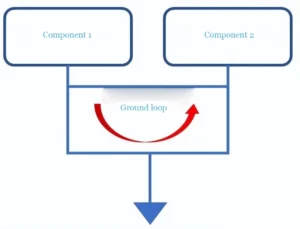
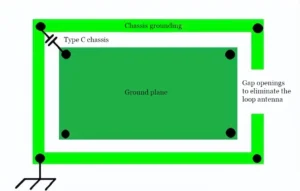
When grounding the chassis, you can avoid a ground loop by introducing a gap in the ground path connected to the chassis, as shown below.
The use of a capacitor provides an AC ground point. This is an ideal solution for electrical equipment that requires a wall outlet and needs to be grounded directly.
Layout of Analog and Digital Components
Engineers place components on signal layers close to ground to ensure short return paths and to couple traces to ground.
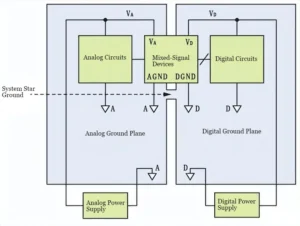
When a PCB includes both analog and digital components, designers handle ground connections with great care.
They physically separate the analog and digital sections of the board, but still connect both sections to the power supply return path.
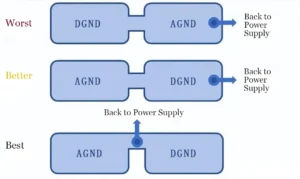
Some people might suggest completely separating the digital ground and analog ground and then connecting them using ferrite beads.
However, this approach can actually create more EMI and noise problems than it solves.
This is especially true when operating at very high frequencies.
A good way to connect these sections is to place the power return path between the two planes, so that the return current from either section does not enter the other plane.
Designers avoid routing traces over the gap between the two ground planes because doing so creates a long current return path that becomes highly susceptible to EMI.
Engineers can use the space between the ground planes to place mixed-signal components such as ADCs.
Ground Plane Vias
Using vias helps prevent ground loops.
Components link directly to ground points, which join all other ground points on the circuit through low-impedance paths.
This arrangement also reduces the length of the return current path.
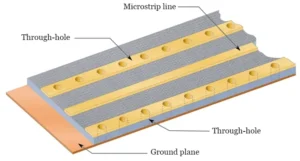
A ground plane typically resonates at a specific wavelength corresponding to the frequency of the current flowing through it.
You should place vias around the ground plane at precise intervals to prevent it from resonating.
Tent vias are an important aspect of PCB design because they draw heat through the vias to the other side of the board, thereby helping to cool components that run hot.
If there are no vias in the PCB layout, you can use a small drill to create a few holes, then thread copper through them and solder them to establish a connection between the two sides.
Decoupling
Decoupling is the process of implementing an LC network adjacent to an integrated circuit chip to provide transient switching current.
Engineers install power pins on the integrated circuit chip to connect it to an external power supply.
They also include ground pins to connect it to the PCB ground plane.
Designers place decoupling capacitors between the power pins and the ground plane to eliminate oscillations caused by the chip’s supply voltage.
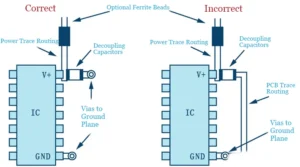
Decoupling capacitors are essential for improving and enhancing PCB performance.
Capacitors are designed to store charge, so decoupling capacitors on a PCB act as charge storage devices.
Consequently, if an IC requires additional charge, the decoupling capacitor supplies it via a low-inductance path.
In addition to enhancing PCB functionality, decoupling capacitors effectively reduce noise generated by power supplies on multilayer planes. Furthermore, they also reduce EMI.
All connectors on a PCB should be grounded
In connectors, all signal lines must run in parallel. Therefore, you must use ground pins to isolate the connectors.
Each circuit board may require multiple connector pins connected to ground.
Using only one pin may cause impedance mismatch issues, leading to oscillations.
If the impedances of two connected conductors do not match, the current flowing between them may bounce back and forth; these oscillations can alter system performance and prevent it from functioning as intended.
The contact resistance of each connector pin is very low, but it may increase over time.
Therefore, it is best to use multiple ground pins. Approximately 30% to 40% of the pins in a PCB connector should be ground pins.
Connectors come in different pin pitches and can have varying numbers of pin rows.
Connector pins can also be parallel to the PCB surface or perpendicular to it.
Always Provide a Common Ground Point
Whether it’s a single-layer or multi-layer PCB, you need a point to connect all ground points.
This could be the metal frame of the enclosure or a dedicated ground plane on the PCB; you’ll often hear this common ground point referred to as a star ground.
Minimize Series Vias
Designers minimize series vias in ground paths and instead route component grounds directly to a dedicated ground plane.
As engineers add more through-holes to the circuit board, they increase the impedance that must be managed.
This is particularly important for fast transient currents, which can convert impedance paths into voltage drops.
Design the Grounding Before Wiring
Before proceeding with any wiring, be sure to properly design the grounding system first, as this forms the foundation of the entire wiring process.
Determining the Path of Current on a PCB
Many designers only consider where their signals are transmitted, but every signal has a return path through the ground.
The forward and return paths of a signal carry the same current, which affects power supply stability and ground bounce.
You can use Kirchhoff’s Current Law to understand how current flows through your circuit.
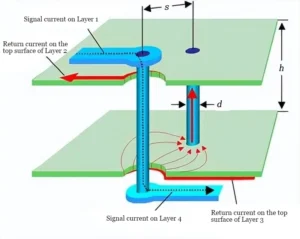
Ground Layers in PCB Stacks
In multilayer PCBs, the arrangement of power, signal, and ground layers within the stack has a significant impact on signal integrity and will influence routing strategies.
It is important to keep ground layers close to signal layers to minimize the return path for current.
In a 4-layer board, power and ground layers are typically located on the inner layers, while signal traces and components are placed on the outer two layers.
Planning for Dynamic Variations Between Ground Planes
When routing ground connections between layers on a multilayer PCB, always account for dynamic variations.
This is especially true when dealing with applications that require long cable runs.
In these situations, you can use low-voltage differential signals, optocouplers, and common-mode chokes to manage these variations.
Note the Separation of Mixed-Signal Tracing
Designers must isolate the analog sections of the circuit board, including analog-to-digital converters (ADCs) and digital-to-analog converters (DACs).
When designing the PCB “layout,” be sure to isolate these areas.
Avoiding Ground Loops
In practice, engineers use the term “ground loop” to describe any situation where differences in ground potential affect a system.
A typical example occurs when two modules connect via a long cable, and the return current in the cable raises the ground potential of one module significantly above that of the other.
However, here we are specifically referring to ground loops. For example:
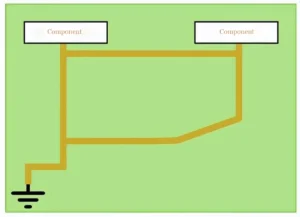
If you must use separate PCB traces for a large number of ground connections, it is actually quite easy to create loops as shown in the figure above.
The presence of a ground plane does not prevent the creation of ground loops, as CAD software will not stop you from drawing traces between ground points.
However, if you consistently use vias or through-holes for ground connections, the problem should largely disappear:
Placing vias on the plane allows a direct connection from the component to a ground point, which then links to all other points in the ground network through a low-impedance path.
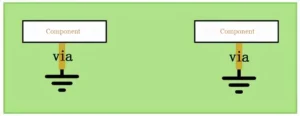
It is important to place components correctly in PCB layout.
Designers can make ground plane connections directly beneath the components to avoid ground loops.
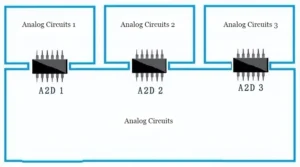
In PCB layouts with multiple subsystems, designers carefully place mixed-signal components so that they connect board partitions beneath them, preventing ground loops.